
In an object-based system, the materials are presented in a left to right configuration that helps the individual see concretely:
- What work?
- How much work?
- When am I finished?
- What comes next?
Left to right configuration: This configuration is appropriate because when we visuo-spatially orient ourselves to a starting point in activities, we often orient to a left-side starting point (e.g. reading from left to right; dirty dishes in sink on left, clean dishes in drying rack on right).
The object-based to-do list allows the student to visualize a more concrete and tangible representation of the four elements of a system. Bins or containers are used to organize materials and keep needed items together for easy access. Bins or containers are set up on the student’s left hand side, and the student places the completed bins on their right hand side.
In some situations, the student may be required to work in an area that is away from the bins. In such cases, the student would be taught where certain items go when a task is finished (e.g. window cleaner goes in the cleaning pantry; a completed task goes on the back shelf of the classroom).
The left-to-right to-do list can also involve other visual cues to indicate when a task is complete. In the images below, the student: 1) Uses the objects from the bin, 2) replaces the object in the bin, and 3) closes the bin to indicate that the task is complete. By providing a physical barrier to the objects upon completion, this type of arrangement may be beneficial for some students who have difficulty recognizing when the time to use an object has expired and it is time to move on to the next task.
When to use bins or containers?
Bins or containers are most helpful when there are several materials involved in a task. Bins or containers can be appropriate for concrete learners because the objects contained within it explicitly represent what should be done. In many cases, each bin contains all of the materials needed to complete one specific task. The level of difficulty is determined by the task put inside the bin. For more information on determining whether to use this object-based container system, click here.
How to create a to-do list with bins and containers
- Place the materials needed to complete the work tasks into separate bins. Thus, each bin holds the materials needed for one specific task. Usually between 3 and 5 bins are a good number of bins / tasks. However, for individuals who have limited work skills, you may choose to teach the individual to independently complete one or two simple tasks in separate containers to obtain a desired reinforcer (what comes next?) that is placed within visual range in the left-to-right system.
- When the student looks to the left, he can easily see what needs to be completed. The number of bins indicates the number of tasks he has to do.
- The student takes one bin from his left-hand side.
- He completes the task at the work area, or in the specified location to complete the task.
- Once it is completed, he places the finished task and bin on his right-hand side, or in another designated finished area.
- Then, he takes the next bin from his left-hand side, and repeats the steps until all tasks are completed.
- There will be a visual cue at the end of the tasks that reminds the student what to do next. It might signal to the student that he should check his schedule, take a break, engage in a desired activity or go to a different work area.
More than 5 bins can be overwhelming and take up too much space. If the student has more than 5 tasks, then set up two separate work sessions if possible. Do one work session, and when that is complete, take a break and set up another work session.
Lincoln High School has a sustainable garden on their campus and Alan maintains this garden daily as part of his school-based vocational training. Alan has several tasks to complete each morning at work.
The materials needed for each task are separated into bins that are placed from left to right on a shelf:
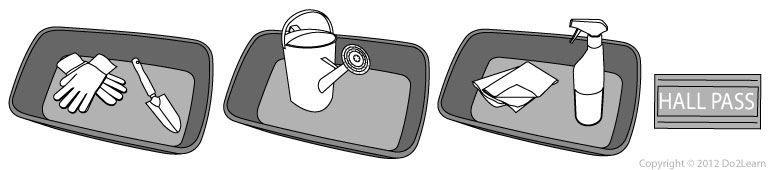
In one bin, there are garden gloves and a trowel for Alan to use when weeding in the garden.
Visual Cues: A visual cue is something added to the core structure of the environment, the schedule, the to-do list, and the tasks themselves. The cue turns up the “visual volume,” so to speak, on that core structure.
In the second bin, there is a watering can for Alan to use when watering the indoor plants. Additional visual cues, in this case gardening stakes, are in the garden to help him know what to water.
In a third bin, there is cleaning solution and a cloth for Alan to use to wipe down the glass doors, windows and table. Additional visual cues (post-it notes, in this case) are attached to the surfaces that he will clean.
Alan takes the first bin off the shelf, and goes to water the plants. He then puts the empty bin on a loading cart (his designated finished area). He then takes the next bin and finds the trowel and garden gloves. He goes to weed the plants using these materials. When he is done, he put these materials and the bin on the same loading cart, his “finished” area.
The “finished” area is a designated space where items are placed at the completion of a task.
He completes all of his tasks by using the bin work system. He can see the progress he is making by watching the bins go from the shelf on the left to the loading cart on the right. When he is done with these tasks, he retrieves the “hall pass” card and returns to the classroom.
Summary:
“What to do?”
The tasks provided in the bins.
“How much do I have to do?”
The number of bins lined up on the left, in this case three tasks.
“When I am finished?”
Alan is finished when all the bins on the left have been completed and are put in the finished place on his right hand side. He can see the progress he is making as he is working because the bins on the left will disappear.
“What’s next?”
At the end of the sequence of bins, there should be an indication of what to do next, such as a “check schedule” card or written reminder. In this case, Alan finds a hall pass, signaling that he is to return to his classroom.