
What type of to-do list is most appropriate for the student: A written to-do list, a to-do list that combines words and pictures, a picture-matching to-do list, or an object-based left to right system?
Presenting a to-do list that sequences a series of tasks before a break or before contacting the supervisor can lead to independent movement between tasks, a very desirable skill in the work place. Devising a to-do list that is easy for the student to decipher and to manipulate can support long-term success. Often the natural supports of co-workers and supervisors can be enlisted to help set up the list just before the student will work.
The more accomplished student may be able to set up his own to-do list after checking with his supervisor. In this case the list may prevent ‘double-checking’ or bothering the supervisor at other times and thus improve efficiency.
Does the student’s to-do list answer these four questions: “What do I have to do?” “How much do I have to do?” “When am I finished?” “What next?”
The student should see in the to-do list the number of jobs and the steps of each job. He may need a file box or file that provides the visual instructions for specific jobs that he goes to after referring to the to-do list.
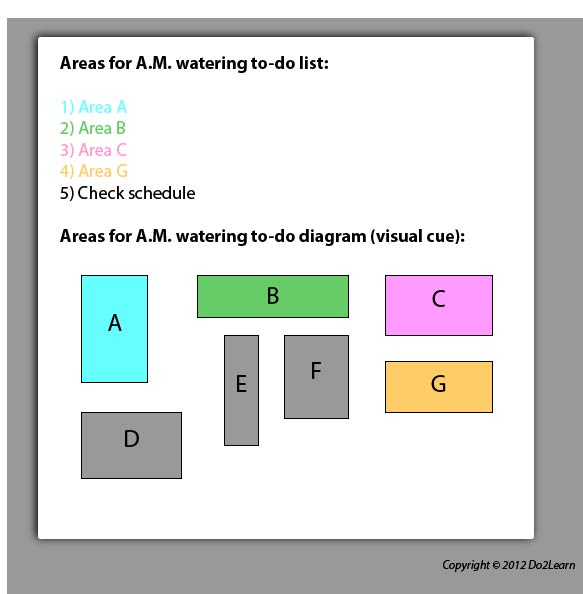
For example, the employee responsible for watering the plants throughout the nursery at the beginning of a shift may use a to-do list to show the process. This may be written or a visual-based to-do system. Below is a written to-do list along with a supplemental diagram of a nursery floor plan. The written to-do list may stand alone for some students, but others may benefit from the added color-coded graphic organizer:
How will the student interact with his to-do list to ensure that he is consistently using and referencing it? Will he check items off, delete items, place completed items in a folder, place items in a “finished” bin to represent completion of a task, etc.?
What additional cues (e.g. time durations, highlighting, instructions, reminders) might you add to the to-do list to clarify expectations and promote attention to key elements?
In order to align this intervention topic area with the unique needs of the student, do you need to create a to-do list in the View2do program?