
What type of schedule does the student need (a written schedule, a picture-written schedule, a picture schedule, or an object-based schedule) to independently determine where to go for each event of the day and in what order?
With many food preparation positions, variation needs to be addressed in the process of matching the student to the job description. The job match requires looking at the food preparation tasks available and carving the responsibilities so that the consistency or variety fits the student and the setting in balance. Having some consistent daily responsibilities is likely. Define those consistent tasks and those changing tasks to develop the schedule. Creating a template schedule may be necessary that lists the consistent daily tasks and provides blanks for those tasks that vary. While some tasks may not shift from day to day, others do and so they are not always present on the template. Note that the schedule can be adapted to have check marks so that the student sees progression in his work. Also note that specific tasks are identified on this schedule since this student works consistently at a food prep station as her base from which she moves to complete various tasks.
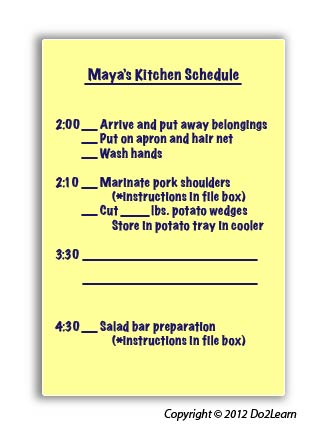
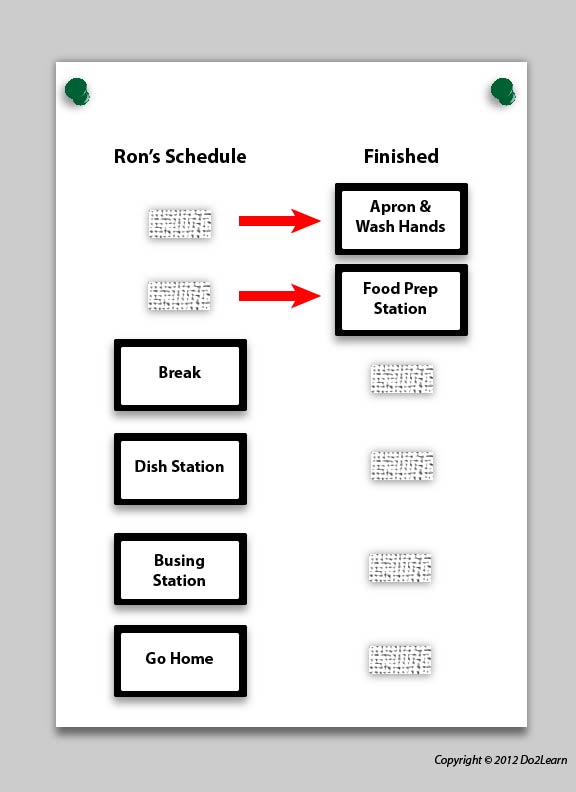
For others, the tasks may be fairly consistent but management needs certain tasks handled at different times on different days. In this case, you may want to create a schedule that can be manipulated or changed daily. Placing job tasks or spaces for work on laminated cards that are attached to a stable schedule by Velcro may provide the flexible framework for the student’s schedule.
The schedule may look like this. The schedule shows him where to go (specific stations). At each station he may have a to-do list of varying tasks. The student moves a card to the right as he starts a task:
How will the student interact with his schedule to ensure that he is consistently using and referencing it? Will he check items off, delete items, place completed events in a folder, place items in a bin to represent completion of an activity, etc.?
Is it beneficial to laminate the schedule so that the manager can change it as needed and so that the student can check it off or cross it out as needed? Protection of schedules against water and food damage suggests the need for thick laminate, or for a schedule on an erasable vinyl or plastic surface, instead of replaceable daily paper schedules. Since many tasks will be consistent, even if they occur at different times during each shift, the student may alternatively have the tasks printed on laminated scheduling cards that are connected to the schedule with Velcro. (It might be necessary to have extra Velcro available in order to replace it on a laminated schedule on occasion) As the student completes each task, he can remove the task card and place it in a “finished” envelope attached to the bottom of the schedule.
Is the schedule available to the student at all times? If not, what adjustments should you make to ensure its accessibility?
The schedule can be kept on a clipboard in a consistent location. Or it can be in a notebook that is kept at the student’s workstation at the job site. The schedule can be mounted on a wall in the student’s “base work area”. Perhaps the schedule is housed in his mobile device?
What additional cues (e.g. time durations, highlighting, reminders) might you add to the schedule to clarify expectations and activities?
Times might need to be added to the schedule if specific tasks need to be completed by a certain time. For example, potatoes need to be washed, wrapped and placed in the oven by 10:00.
In order to align this intervention topic area with the unique needs of the student, do you need to create a schedule in the View2do program?