
What type of graphic organizer(s) might the student require in order to visually represent and organize the concepts, feelings, or behaviors that relate to this particular topic?
The graphic organizer is likely to be useful in the process of priming the student for a job. The organizer may assist in ‘mapping’ the various elements of the job or in ‘mapping’ the jobs that the student prefers vs. the ones that are less desirable. The organizer supports the student in seeing the ‘big picture’ and may overcome resistance associated with a certain task that is not interesting or seems too difficult to the student. An organizer may assist in getting motivation to do a non-preferred task in order to have the opportunity to do tasks that are strengths or of high interest:
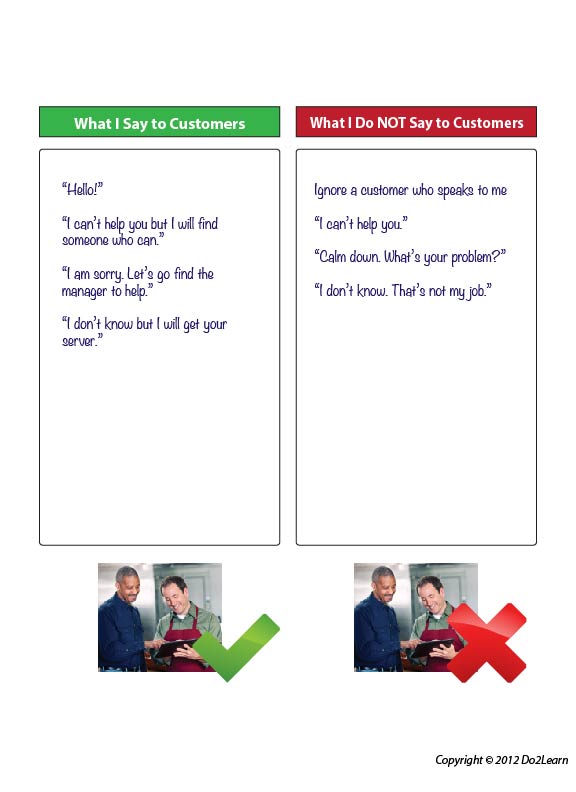
It is possible that you will need to create a graphic display that shows the student what to say and what not to say to customers. This can be used in practice sessions or, as needed, on breaks on the job to prepare for customer interactions. The graphic organizer may prove helpful when used with scenarios that provide practice in customer interactions.
Over time, practice and discussion, does the organizer present clear and specific details that support the student in appropriate customer interactions? As stated previously, your environmental design and planning around this interaction are crucial:
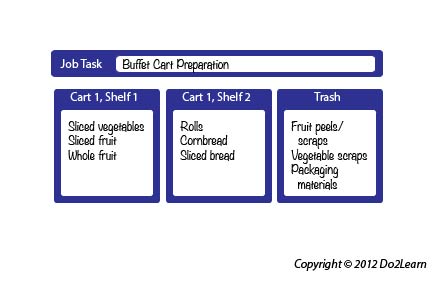
Another organizer may arrange information to clarify issues of a specific work environment. For example, the following could be used to support a student working in a food preparation department. Such a tool in the form of a blank template may be used by the worker as a tool to write-in details per task or shift:
Is there a way to visually or thematically incorporate the student’s interests into this graphic organizer to increase motivation and engagement?
What additional visual clarity cues (e.g. icons, bolding, highlighting, color-coding) might you add to the graphic organizer to clarify concepts and to direct attention to key details?
There are any number of visual clarity cues that may be added to an organizer to help the student focus on key details. Equally important is incorporation of these cues when teaching the tool. If the student is learning to use the above customer interaction organizer, how might you add clarity to support the student’s comprehension of where to write certain items? The images on the template are only one example of such a visual cue; try adding relevant photos of the student, writing the “What I Say” column with green text and the other with red, or having each side of a 2-colored flip card represent each column.
In order to align this intervention topic area with the unique needs of the student, do you need to create a graphic organizer in the View2do program?
