
How can a schedule help the student manage their repetitive/stereotyped behaviors?
Repetitive behaviors often provide some type of relief or enjoyment for individuals. Therefore, the goal is not to eliminate them entirely, but rather set parameters around them so that the student is appropriate at the workplace. Provide the student with an opportunity to engage in repetitive behaviors using their schedule. If they use a written schedule, write in when they are allowed to engage in their repetitive behavior and where. It may help to also write how long it is okay to engage in their repetitive behavior.
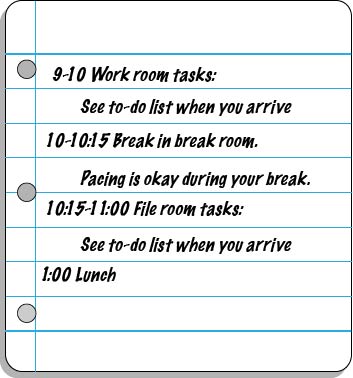
For a student who likes things to be “just right” in their environment, perhaps provide an opportunity for them to arrange things at the very beginning of the day by adding it to their schedule, or at the beginning of a specific task by adding it to their to-do list. That way, the student can fix what they need to and then carry on with their day. Some students may need two of these sessions, one at the beginning of the day and one placed at the end of their schedule to serve as additional motivation to complete their other tasks. Some students may even need a quick “fix it” session after the completion of each task on their schedule so that they can focus on the following task.
For a student who likes to talk repetitively about a certain topic, schedule that time into their schedule. For example, write in “Transportation Time” for a student who wants to discuss city transit systems in great detail. If it is not appropriate for him to actually engage someone else at work in this discussion, consider arranging opportunities for him to use the internet or journal to write about his interest area.
Finally, a very important part of managing fixing behaviors will be to keep the student engaged in other tasks. Keeping their mind off of their surroundings will be critical. Thus, tasks on their schedule or to-do list should be highly motivating, distracting tasks. Once the student is able to complete highly motivating tasks without fixing things in their environment, you can begin to gradually add less motivating tasks to their to-do list as well.
What type of schedule does the student need (a written schedule, a picture-written schedule, a picture schedule, or an object-based schedule) to independently determine where to go for each event of the day and in what order?
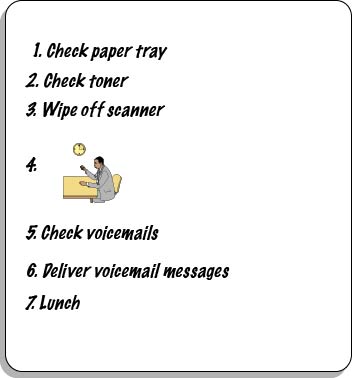
Don’t be afraid to blend the type of schedule used by the student! For a student who uses repetitive behaviors for coping or calming strategies, it may be very difficult to get him to adjust to limiting the behaviors to scheduled times. It can help to distinguish the “relaxation” or “break” item on the schedule so the student can more easily recognize when it is appropriate to engage in the behaviors. A blended schedule may be used having a picture or icon representing the “break” time within the written context of the rest of the schedule.
How will the student interact with his schedule to ensure that he is consistently using and referencing it? Will he check items off, delete items, place completed events in a folder, place items in a bin to represent completion of an activity, etc.?
Is the schedule available to the student at all times? If not, what adjustments should you make to ensure its accessibility?
For a student who may leave their seat to arrange things in their environment or engage in a repetitive behavior, having a transportable schedule will help in redirecting them back to an appropriate task. When the student gets off task, bring them their schedule as a means of showing them what they should be doing and possibly, when it is okay for them to engage in repetitive or fixing behaviors.
What additional cues (e.g. time durations, highlighting, reminders) might you add to the schedule to clarify expectations and activities?
If the student uses a written or picture schedule, try highlighting the “break” with bright colors, or use an image with a different colored border from the other schedule items.
In order to align this intervention topic area with the unique needs of the student, do you need to create a schedule in the View2do program?