
What type of schedule does the student need (a written schedule, a picture-written schedule, a picture schedule, or an object-based schedule) to independently determine where to go for each event of the day and in what order?
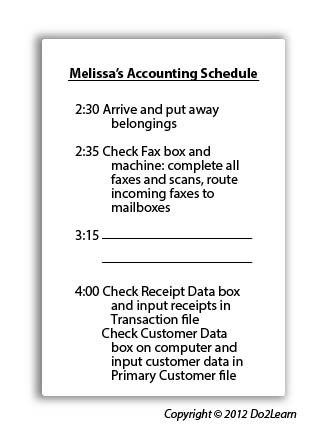
With many office accounting, merchandise processing or shipping/receiving positions, there will be some consistencies in the activities of any work day, depending on the time of the shift. Creating template schedules for various shifts may assist clarity of where to work and the general activity that will be completed. While some tasks may not shift from day to day, others do and so they are not always present on the template. Generally, the trucks bring merchandise on specific days. On other days, the focus may be rotating stock, creating displays, cleaning chores, etc. In accounting positions, because supervisors and co-workers are often willing to fill in the blanks on a list or schedule prior to the student’s shift, this is a natural support that can be used in the future:
For a job with less time-specific tasks that vary in duration, such as unloading trucks that take a few minutes or several hours, the student may benefit from a schedule structured around times for certain planned events:
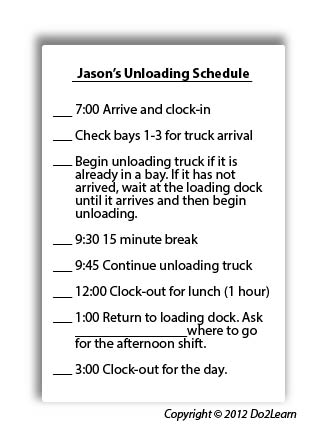
How will the student interact with his schedule to ensure that he is consistently using and referencing it? Will he check items off, delete items, place completed events in a folder, place items in a bin to represent completion of an activity, etc.?
Is it beneficial to laminate the schedule so that the manager can change it as needed and so that the student can check it off or cross it out as needed? Since many tasks will be consistent, even if they occur at different times during each shift, the student may alternatively have the tasks printed on laminated scheduling cards that are paper-clipped to the schedule. As the student completes each task, he can remove the task card and place it in the “finished” envelope.
Is the schedule available to the student at all times? If not, what adjustments should you make to ensure its accessibility?
The schedule may be kept on a clipboard in a consistent location. Or it could be in a notebook that is kept at the student’s desk at the job site. The schedule may be mounted on a wall in the student’s “base work area” or on his desk. Perhaps the schedule is housed in his mobile device.
What additional cues (e.g. time durations, highlighting, reminders) might you add to the schedule to clarify expectations and activities?
In order to align this intervention topic area with the unique needs of the student, do you need to create a schedule in the View2do program?
