
What type of to-do list is most appropriate for the student: A written to-do list, a to-do list that combines words and pictures, a picture-matching to-do list, or an object-based system?
For many accounting positions, the schedule and to-do list may be combined so that both the location and the specific tasks are addressed in the same visual support, as you saw in the accounting schedule noted above in Schedules.
For the student working in merchandise processing, the to-do list may be provided specifically at work stations set up for the individual student. For instance, the to-do list at the processing station may look like this:
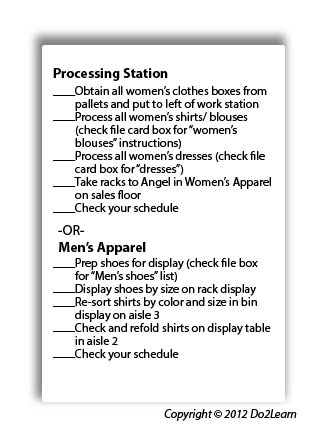
Consider whether the student will need cues (e.g. time durations, highlighting, instructions, reminders) added to the to-do list to clarify expectations and promote attention to key elements.
Be sure that the student is provided with a to-do list in the most appropriate format. For example, the student may be able to read but can operate more efficiently with less anxiety if using a picture-based to-do list:
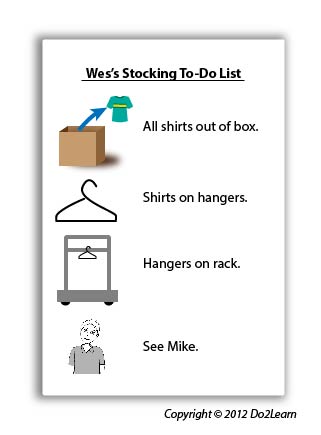
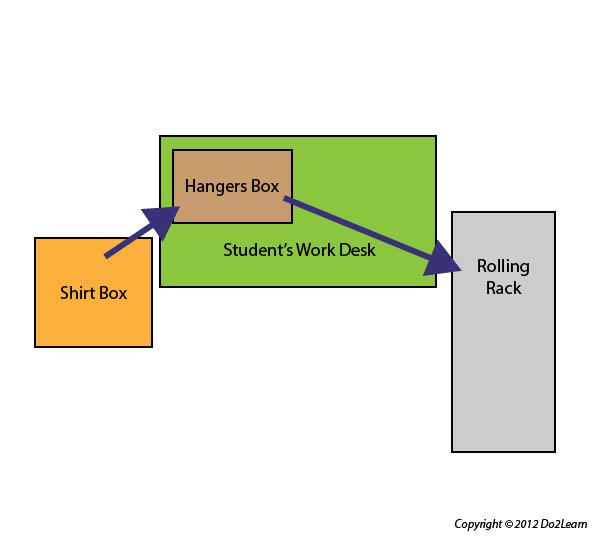
Some students will better understand object-based to-do lists. These may involve the use of bins and physical arrangement of materials to guide the student through a task. For example, a to-do list involving unpacking and hanging shirts may follow a left-to-right system where the student unpacks shirts from the left, places them on hangers, and hangs them on a rolling rack to the right. A “Check Schedule” item or card can be placed in or on the shirt box to let the student know what to do when finished with the last shirt:
Does the student’s to-do list answer these four questions: “What do I have to do?”
“How much do I have to do?” “When am I finished?” “What next?”
It is very important that the to-do list clearly addresses these four concepts. The object-based to-do system above answers these as follows:
How will the student interact with his to-do list to ensure that he is consistently using and referencing it? Will he check items off, delete items, place completed items in a folder, place items in a “finished” bin to represent completion of a task, etc.?
In order to align this intervention topic area with the unique needs of the student, do you need to create a to-do list in the View2do program?
