
What type of schedule does the student need (a written schedule, a picture-written schedule, or a picture schedule) to independently determine where to go for each event of the day and in what order?
The daily schedule can serve to keep the student engaged and busy. Moreover, it may point to an exact time when the student will check his calendar, follow up on an interview and/or make other applications or calls.
What information should be included on the schedule and the calendar? Carefully balance including enough details to support the student while restricting the amount of information to avoid confusion. For example, a weekly calendar may have only the name of an employer on the day and time to contact for follow-up. A separate reference in the student’s notebook may house the details of the employer’s name, contact information, etc. (see Visual Cues)
How will the student interact with his schedule to ensure that he is consistently using and referencing it? Will he check items off, delete items, place completed events in a folder, place items in a bin to represent completion of an activity, etc.?
Is the schedule available to the student at all times? If not, what adjustments should you make to ensure its accessibility?
What additional cues (e.g. time durations, highlighting, reminders) might you add to the schedule to clarify expectations and activities?
A job search schedule or calendar will be different from a daily schedule as this can document interviews, contact dates, possible answers or other information regarding the job search. For example:
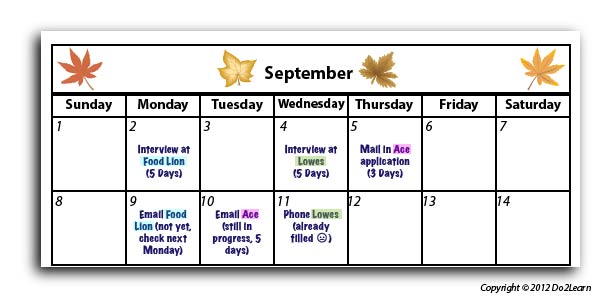
Each company name could be highlighted in a different color for clarification.
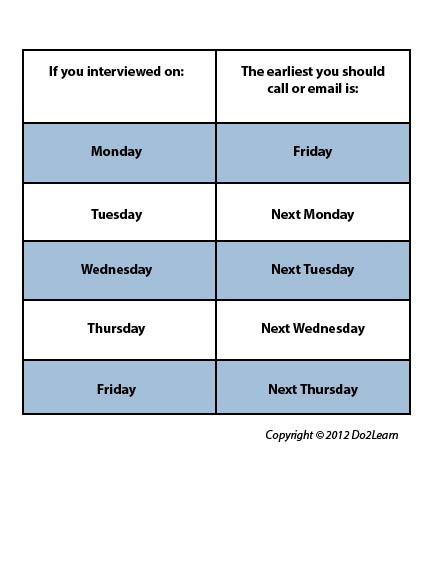
A reminder card could be attached to the schedule to help the individual determine the time frame in contacting each company. Some students might need a more detailed calendar listing specific times to engage in job searching, contacting the companies, and scheduling other activities to distract while waiting. Below are two examples:
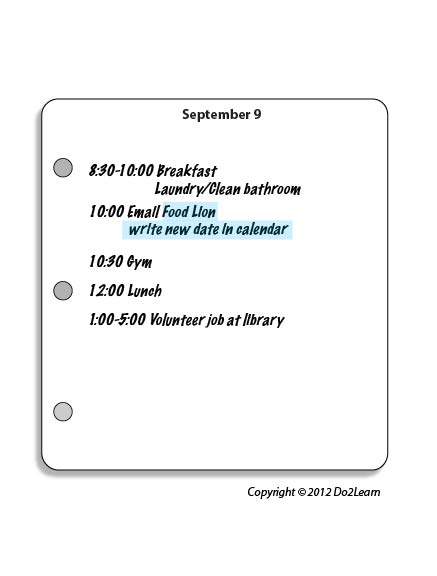
In order to align this intervention topic area with the unique needs of the student, do you need to create a schedule in the View2do program?
