
How can a schedule or to-do list be used to help my student tolerate change?
An important step in helping a student tolerate change is to teach them to use a schedule and/or to-do list. Both schedules and to-do lists provide structure to the day without making the student routine-bound and help the student to visually ‘map’ potential change. Specifically, the student should become reliant on their schedule or to-do list, not a particular routine or sequence. To accomplish this, the tasks and activities should vary on the student’s schedule from day to day. The student learns to reference their schedule to see what to do rather than memorizing a certain routine. This is important when teaching a student to tolerate change. First, by varying tasks on their schedule, the student will become accustomed to variety and changes in tasks and in the order of their tasks. Secondly, if the student is in the habit of referencing their schedule often, you can then use the schedule to indicate when change will occur. On a written schedule, you may write in that a change is to occur.
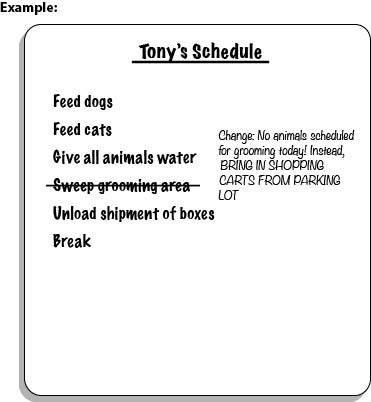
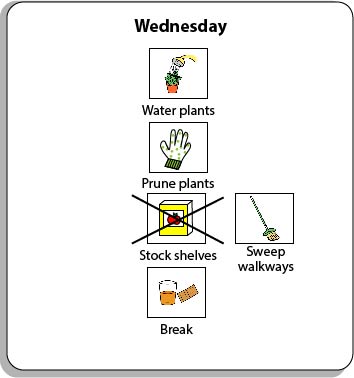
You may also visually indicate that a change is to occur on a picture schedule. One way to do this is to put an “X” over the item that will no longer occur. If you are using picture cards, you can cut out an X, laminate it, and fasten it over the picture card with a paperclip. Next to the crossed out picture, attach a picture of the item that is to occur.
The reason we use the schedule to indicate that change is to occur is because visual information is often easier for individuals to process than auditory information. We want the message to be clear that a change is happening. Using a predictable and clear way to indicate change can also alleviate some of the anxiety around it. The message is clear, confusion is reduced, and thus, less anxiety. If you verbally inform the student of change, they may not fully understand or become confused or overwhelmed when processing the information. It is best to convey change visually to play to the student’s strengths. The student’s schedule or to-do list are the obvious, practical tools to use to indicate change.
What type of schedule or to-do list does the student need (a written schedule/to-do list, a picture-written schedule/to-do list, a picture schedule/to-do list, or an object-based schedule/to-do list) to independently determine where to go for each event of the day and in what order?
It is important that you are using the appropriate type of schedule or to-do list for the student. The schedule or to-do list should be geared towards the student’s toughest day. If pictures come most easily to the student, especially when they are stressed, then that’s probably the most appropriate choice- even if the student has some reading skills. For more information on how to create the most appropriate schedule or to-do list for the student, review those sections in the Assessment and Intervention unit.
How will the student interact with his schedule to ensure that he is consistently using and referencing it? Will he check items off, delete items, place completed events in a folder, place items in a bin to represent completion of an activity, etc.?
Again, this will vary by what makes the most sense to the student. Have they been successfully using a certain kind of schedule in the past? If so, go with that system if it works. You do not need to re-invent the wheel. For more information, review the Schedules and To-Do Lists sections within the Assessment and Intervention unit.
Is the schedule available to the student at all times? If not, what adjustments should you make to ensure its accessibility?
What additional cues (e.g. time durations, highlighting, reminders) might you add to the schedule to clarify expectations and activities?
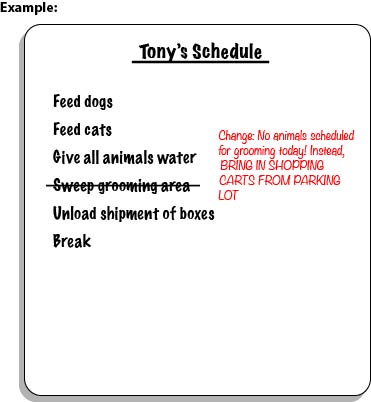
Using a different font color is very simple and can draw attention to a change in the schedule. Here is the example used previously with the additional visual cue of red font.
In order to align this intervention topic area with the unique needs of the student, do you need to create a schedule in the View2do program?