
Schedules are visual supports that organize the school or work day and tell the individual where he will go that day. Schedules help focus attention on the sequence of places and events. The schedule allows the individual to predict and understand what is happening during the day. This, in turn, can reduce anxiety and increase flexibility and efficiency.
Visual schedules provide the answer to the question “Where do I need to go and in what order?”
Reasons to use a schedule:
 |
Improves communication from the educator, supervisor, or job coach to the individual . |
|
Improves the individual’s understanding of what will happen, when, and where. Remember that the schedule can clarify both sequence of events and ‘time’ of transition. When a student finishes within a certain space, routine tells him to ‘check his schedule.’ The schedule clarifies the transition to the next space. Time may thereby be represented by the sequence of spaces or by additional cues on the schedule to show time within a space.
|
|
Improves the individual’s independent ability to make necessary transitions from place to place during the school or work day. |
|
Improves the individual’s ability to follow the school, classroom, or workplace’s timetable. |
|
Improves the individual’s flexibility in dealing with changes in the routine. |
|
Reduces the individual’s anxiety about the unknown or not knowing what to expect during the day. It adds an important element of predictability by visually clarifying the sequence of places/events during the day. |
|
Is easy to design and implement for classroom, vocational, community, and home-based contexts. |
|
Finally, don’t most of us use some form of a visual schedule to organize our day – a day planner, cell phone calendar, etc? Thus, a schedule should not be viewed as a prompt as it actually promotes independence in nearly all of our lives. |
Overall, the schedule helps the individual to see the big picture and predict upcoming changes and variations that might otherwise throw him/her off. The schedule increases efficiency and independence while preventing potential behavioral problems.
Guidelines for creating a schedule that works:
1. The schedule should be presented in a format that will be understandable to the individual .
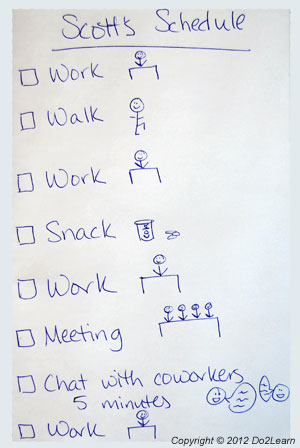 Specifically, the schedule could be formatted using words, pictures, a combination of pictures and words, or objects. The format of the schedule is determined based on the student’s individual strengths and needs. Note that you choose the format of a schedule based on what the individual can follow independently even on the “hardest” day. The schedule is not a means for teaching literacy. It is a means for teaching where to go in what order.
Many individuals have used schedules for years in school, with the help of student agenda books, electronic planners, clipart, Google images, photographs, or downloadable programs like "View2do." If those systems have worked well to promote accuracy and independence, and the student is comfortable with them, there is no reason to dramatically alter that format for the job setting.
It is important to remember that actually being able to use the schedule is a skill which may need to be taught. Recognizing the purpose, organization, and steps of using a schedule are vital to successful implementation. Ensuring that the student has the skills to meaningfully use the schedule is a must.
2. Systematic instruction of the use of a schedule to a level of independence is crucial.
The level of the schedule (words, picture, or objects) should be geared towards the student’s “hardest” day. Specifically, the schedule should make sense to the student even if he/she is frustrated, anxious, or having a meltdown. Someone who is not a strong reader should use a picture schedule if that is what makes the most sense to them when they are most stressed, even if they can follow a simple written schedule on good days.
3. The student should interact with the schedule. This interaction ensures that the student is using and referencing the schedule regularly.
 The student might interact with the schedule in the following ways:
- Marking off finished activities
- Checking a box as each activity is finished
- Flipping a card to see the next activity
- Carrying an object
- Transferring a velcroed card to the designated location
- Adding to or reordering the schedule (under controlled circumstances)
The student should be able to check his /her schedule with a nonverbal cue (a “check schedule” card, timer, or other visual or auditory cue). The purpose of a nonverbal cue is to increase the student’s independence. At the end of activities within a space, the nonverbal cue (picture card, written reminder, etc.) should be available to the student, possibly at the end of the to-do list. That way, the visual cue is giving the instruction rather than having an adult intervene and prompt.
4. When possible, challenging or non-preferred tasks should be interspersed with easier or preferred tasks.
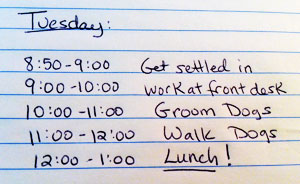 Everyone needs the interspersal of more and less preferred tasks in order to maintain stamina across their day. For many individuals, it helps to arrange a motivating event (e.g. break, computer, “go home!”) at the end of the classroom or work schedule.
5. The schedule needs to be available and visible to the student at all times.
- By posting the schedule on or near the student’s or employee’s desk
- By ensuring that the schedule is located on the student’s person and can travel with them from one location to the next (e.g. in their backpack, in their cell phone, in their pocket, etc.)
- By placing the schedule on a portable clipboard
When using a portable schedule, it is often important to develop a functional routine of putting the schedule in a designated spot in each location, to prevent misplacing the schedule. Thus, in designing the spaces of the student’s environment, the instructor constructs a specific location for the schedule that supports the student in routinely keeping up with his schedule. Additional visual cues (e.g. labels, bins, clipboards) may be necessary in each setting to alert the individual to where he keeps his schedule.
6. Incorporate the individual’s interests into the schedule
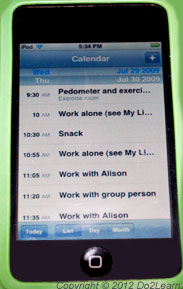 If the individual enjoys and uses a smart phone, it may be appropriate to arrange the schedule using this device. The use of these formats is often less stigmatizing, particularly when the individual is self-conscious about “blending in” at school or work.
 - Allow the student to select a preferred day planner / agenda, rather than being required to use a standard school-issued agenda.
- Incorporate (visually, thematically) the individual’s interest into the schedule. For example, if the student has a strong interest in hockey teams, incorporate those images and themes into his schedule. This engages the student’s focus on and attention to the schedule.
- When possible and with your guidance, allow the student to designate the schedule order. Offering choice is a mediating factor in the development of self-determination.
When appropriate, involve the student in the design and development of his schedule. This is part of the priming process, which increases the student’s “buy-in” and motivation to use the schedule.
7. Consider the length and scope of the schedule.
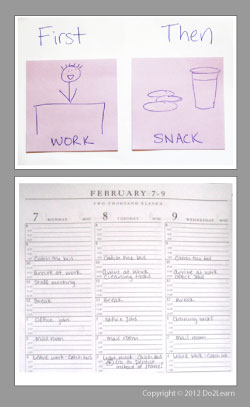 Some individuals prefer to know their full daily schedule while others prefer to see only a few tasks at a time and may get overwhelmed by too much information.
For some individuals, a “First/Then” schedule works the best. Typically the first activity is a work activity, followed by something more preferred. Using 2 pads of post-it notes side-by-side is an efficient way of setting up a First/Then schedule. Frequently, someone who requires an object schedule will use a “First/Then” format.
Think about planning for longer stretches of time (days or weeks at a time).
A weekly or monthly calendar can help students remember deadlines or important activities or events that are occurring in the near future. Plus, seeing an enjoyable event on a calendar in the future can help motivate the student.
Guiding questions to consider: |
|
Visual Schedules
|
