
Computer and information technology are quickly growing fields with many jobs available for interested people with all levels of training and experience. Many computer and IT jobs require at least some post-secondary education, so it is important to consider a student’s long-term goals for a career in these fields when making educational and vocational plans. Even if a student intends to pursue further training in computers or other technologies, it can be important for them to develop a resume that shows computer contact and proficiency in many extracurricular, work, and volunteer settings.
This section will help you guide your student towards these entry-level jobs and volunteer and extracurricular experiences. Many office and retail settings require basic computer skills, and these can be an excellent starting place for a student with an interest in computers. Consider the topics of Clerical Administrative Support, Library, Editing, & Research Duties and Retail Operations as you help the student evaluate those work environments. Then explore what relevant options the student might have for extracurricular activities, such as computer or technology clubs, school newspapers or yearbooks, or volunteer positions doing data entry for nonprofit organizations. All of these will help the student learn the many kinds of work one can do with computers, and to understand the technical and teamwork skills needed in these growing fields. Building a career takes many years, but by taking the process one step at a time, a student can find their niche in the world of technology.

Click on the icons below for detailed information on how to teach this skill.





 Guiding Questions
- Will this environment fit the student’s strengths and interests?
- Will the environment provide either too much or too little stimulation, thus interfering with performance? If working with internet-connected devices, can the student regulate web-browsing behavior or will he need support?
- Will the student achieve competence with the specific set of job duties within this job in a short period of time? If not, is it possible to adapt duties so that he can succeed while fulfilling the supervisor’s expectations for quantity and quality of work?
- Am I arranging visual supports so that the student is self-sufficient for the length of the project?
- Am I careful to avoid requiring too much ‘natural’ support from supervisors and co-workers?
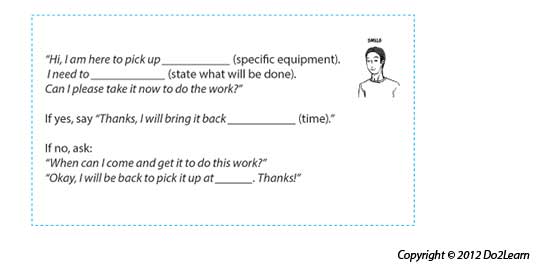
 Communication systems and scripts provide the student with a means to initiate communication. Use these cards to practice different scenarios with your students.
|
 Schedules are visual supports that organize the school or work day and tell the student where he will go that day. Schedules help focus attention on the sequence of places and events.
|
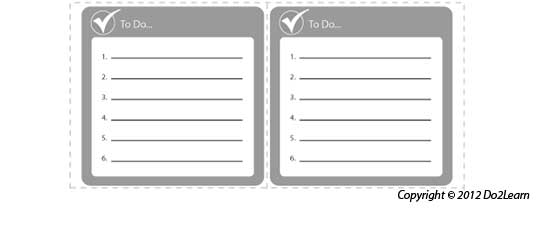
 The to-do list (also referred to as a "work system"or "activity system") visually clarifies a series of activities that a student is to do.
|
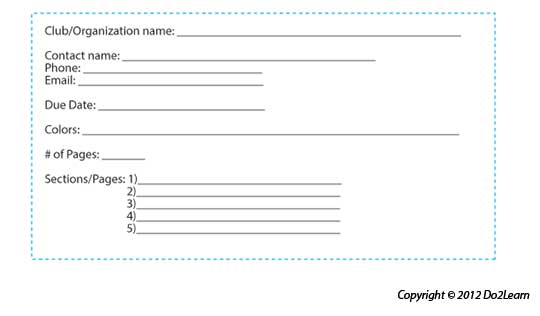
 Graphic organizers can provide a student with a way to represent and organize concepts, thoughts, feelings, behaviors, and potential outcomes.
|
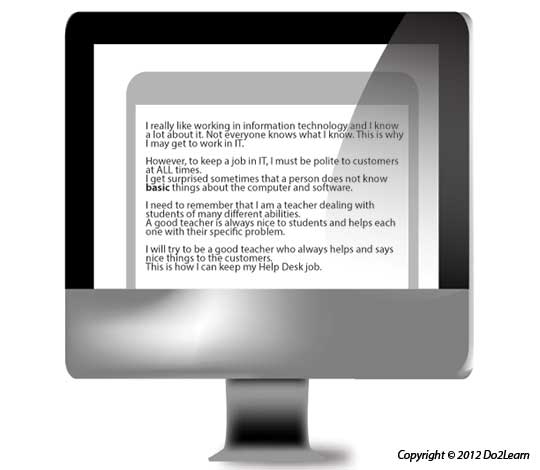
 Social narratives are a set of tools that visually represent social situations and appropriate social behaviors. The social narrative connects the important details of a setting or social situation to support the student in understanding the social context and in developing a new social skill.
|
 Visual Cues are learning materials that students can keep with them to help guide them through real life situations.
|

Video modeling involves the use of video recording as a teaching tool. It involves a student watching a video of the appropriate performance of a task (expected behavior) prior to practicing or potentially using the skill in natural settings.
|
 Does the design of space and furniture help the student focus on the tasks and behaviors expected in the setting? Employers are often very responsive to our efforts to adapt the environment to improve work performance. You may need to assess how to reduce social distractions or proximity to others in specific work stations in the office. If you can see how to adjust where a task is done, if you can see how to move furniture to reduce distractions, if you can see how to organize materials to reduce transition distance and increase worker speed, you are the employer’s best friend. If moving a work station or adding a partition in a key spot will improve speed and quality, there is a good chance that discussion with the employer or supervisor about such adjustments will be met with a willingness to adapt. Does the environmental design address student issues with proximity to others or even distractibility that may reduce performance (working close to others may set up too much interaction)? Probably the most important key in environmental design is the organization of shelves, storage and the work space in a large office or business. Laptops, peripherals, cables, cords, routers, etc. placed wherever within a ‘tech’ work space can lead to serious issues in business operation. Creating the clear spaces for all categories of repaired or ‘properly functioning’ equipment within the work station may be the instructor’s first focus when supporting a student in a project or job setting. Creating a designated space for work to be done vs. repaired items may be worthy of consideration. In some offices, system hardware may be in a common location or in a remote location. It cannot be moved so how will you devise work space around it? If in a common area, are there ways to use furniture and equipment to partition to support student focus? Can other equipment be shifted to assure that the student has a work space that promotes his consistent attention to the tasks he must complete? Certain tasks may be in a high traffic area that may lead to interruptions or distraction. The student may need to remove laptops to a separate work station to complete repairs, to update software, or to perform other operations. It may be important to limit the number of interactions with customers by adapting environmental design to reduce likelihood of interaction. Is the space designed to support independent movement both within and between tasks? Look carefully at the distance between spaces in a work site. If materials for a task are in two separate areas, these may be reorganized for ease of access and closer proximity to where the work is completed. You may be able to adjust the places where work is done so that the student moves quickly between and within activities. Employers respond positively to suggestions of arrangement that will make workers more efficient. Are there clear separate spaces for different contexts or sets of activities (i.e., place to take a break vs. work spaces vs. place for belongings, etc.)? Most employment settings have a separate break and/or lunch area. Having separate spaces for work and for break, for belongings and for lunch, will help in defining what the student does in each space. |
