The Waiting Game
After completing an application or a job interview, the applicant must often play “the waiting game.” This is a frustrating and stressful “game” with unclear rules and, at times, an unclear finish line. Applicants must know how and when to follow up with an employer, and how to deal with the stress of waiting and the frustration of the inevitable rejections. Clear rules for these follow-up communications can prevent inappropriate behavior, such as contacting employers too often or responding with anger to a rejection. The waiting game can be taxing, but knowing how to weather this period can lead to a more effective and lower-stress job search.

Teaching Ideas
Click on the icons below for detailed information on how to teach this skill.





 Guiding Questions
- After the student completes an application or an interview, will he be inclined to follow up to find out the status?
- How will he cope with the anxiety or frustration he might experience while waiting to learn the outcome of his application or interview? How will he cope with not hearing anything and the related possibility that he did not get the position?
- If he does intend to follow up after an application or interview, what method will he use: email or phone? *In most cases, the student will be more comfortable and successful with email follow-ups.
- Does the student recognize and adhere to the unwritten “rules” regarding when to follow up, how many times he might follow up, and why?
- Can he craft and proofread professional email messages to the employer after the application or interview?
- If the student will follow-up by phone, does he know what to say and how to say it during these telephone exchanges? How will he perform when leaving voicemail messages?
- Will the student express frustration (e.g. when he has been waiting to hear; no-one has called him back; he has been told he did not get the position) within email messages or during phone exchanges ?
Visual Supports
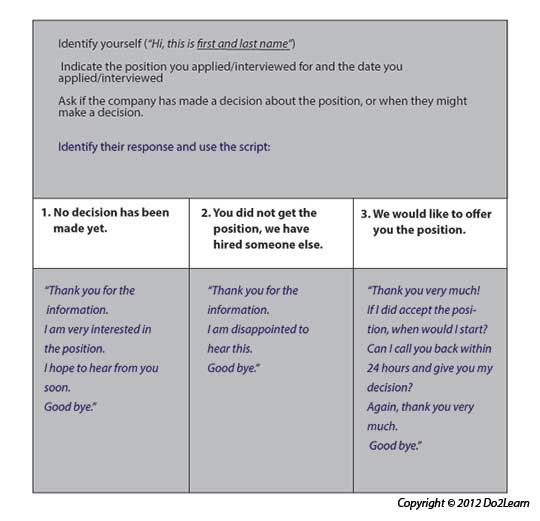
Communication systems and scripts provide the student with a means to initiate communication. Use these cards to practice different scenarios with your students.
|

Schedules are visual supports that organize the school or work day and tell the student where he will go that day. Schedules help focus attention on the sequence of places and events.
|
|
The to-do list (also referred to as a "work system"or "activity system") visually clarifies a series of activities that a student is to do.
|
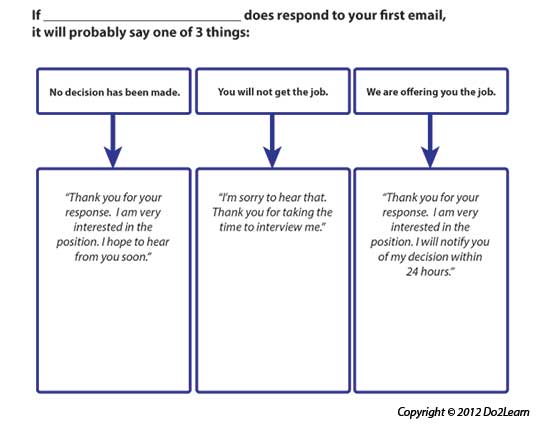
Graphic organizers can provide a student with a way to represent and organize concepts, thoughts, feelings, behaviors, and potential outcomes.
|
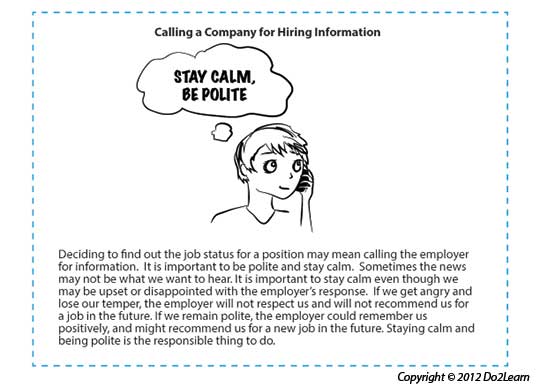
Social narratives are a set of tools that visually represent social situations and appropriate social behaviors. The social narrative connects the important details of a setting or social situation to support the student in understanding the social context and in developing a new social skill.
|
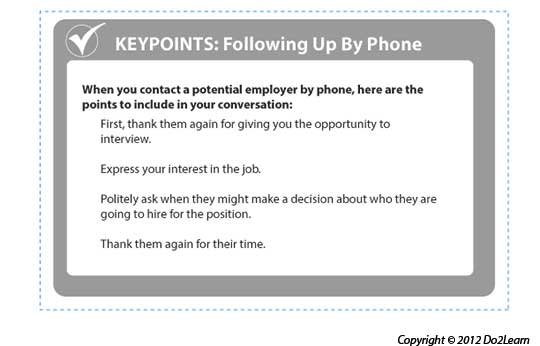
Visual Cues are learning materials that students can keep with them to help guide them through real life situations.
|

Video modeling involves the use of video recording as a teaching tool. It involves a student watching a video of the appropriate performance of a task (expected behavior) prior to practicing or potentially using the skill in natural settings.
|
Does the design of space and furniture help the student focus on the tasks and behaviors expected in the setting?
Does the student need a specific place at home or school designed for focusing on the job hunt? Is there access to a phone and computer for follow-up responses? Be sure that the individual has identified a quiet location where he can follow up via phone.
|