Online Newspapers
Almost all major newspapers have a way to search for jobs online. Go to the homepage of the newspaper of the town or city you live in. On the main tool bar (often located across the top of the website), you will find a heading to click on to search for jobs. This heading is usually titled "Jobs" or "Classifieds." Very often, both of these headings will appear on the websites of major newspapers.
Below are current graphics from the Raleigh Observer on how to look for jobs:

Once you click on “classifieds” this will be your next page:
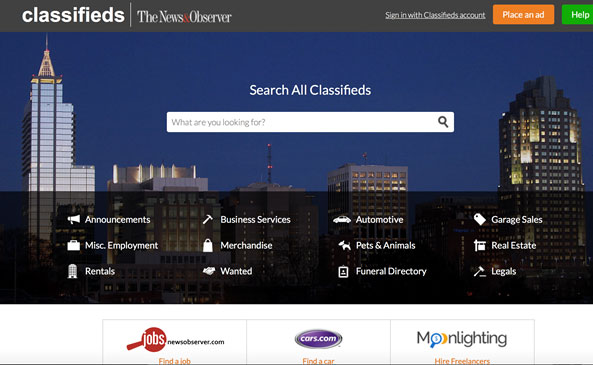
The classifieds section is an advertising section. People often try to sell things such as cars, furniture, pets, or other services in the classified section. The layout of this section is very similar to the layout found in an actual print newspaper. The classifieds section can be a little overwhelming. Try to look for key words such as "jobs," "careers," or "'employment."
Depending on your online newspaper, several things could happen when you click on "Jobs."
- You may be routed to a local online search engine.
- You may be routed to a large national search engine.
 Another online resource for job searches is www.craigslist.com. Craigslist.com is a website where people buy and sell things as well as advertise jobs. It is like a really large, nationwide internet classified section. Another online resource for job searches is www.craigslist.com. Craigslist.com is a website where people buy and sell things as well as advertise jobs. It is like a really large, nationwide internet classified section.
Here are the suggested steps to follow:
- On the homepage, you should click on the city or state where you are interested in finding a job.
- Based on your computer’s location, the craigslist.org web site might automatically route you to the local city classified section. If it does and this is the city you are looking to find a job in you can skip step #2 and 3.
- After you have clicked on a state, select your home city.
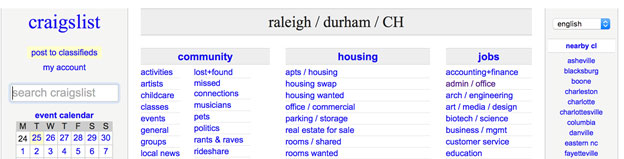
- You will then be routed to the homepage of the city you selected.
- On this classified page, you should focus on the "Job" section. It should list headings (types) of jobs. This is just like the classified section of a newspaper.
- Narrow down your search by using the column on the left side. For example, enter zip code, miles (distance to work), employment (fulltime/ part time), etc.
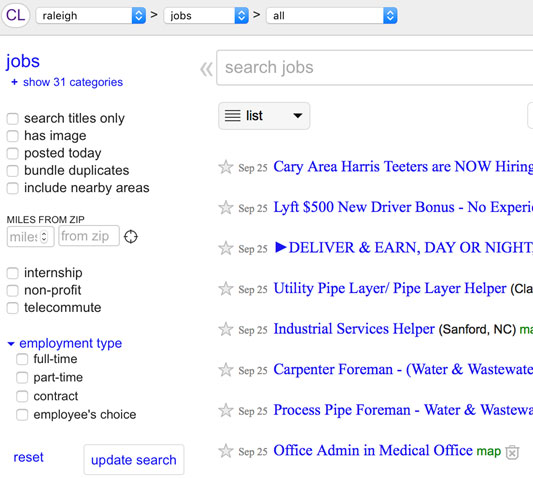
- Click on the heading you are most interested in to search for job listings.
- Click on a job listing you may be interested in. You will probably have to click on many of them to see which ones you are interested in.
- After identifying a few jobs you are interested in, the next step is to contact the person or place listed for more information. Read more tips on how to contact a job from a job listing.
|
 Safety First!
Before sending ANY personal information to a potential employer, you should verify that it is a real company. If you are unsure, talk to someone you trust such as your job coach, teacher, or family member. Always be careful and watch out for scam or fake postings.