Time-Management and Organization - Weekly Calendars
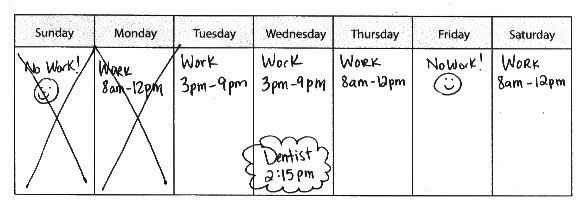
What types of things do you write down on a weekly calendar?
- Your work hours for that week
- Special work meetings –including the time and location
- Work appointments – including the time and location
- Social events – including the time, location, and people involved
- Project due dates / deadlines
- Vacations
- Holidays
- Doctor’s appointments
- Birthdays
Why is it useful?
- A weekly calendar helps you know what to expect each week so you will not forget about an event or appointment.
- It helps you see the "big picture." This means you can see what is going to happen in your work and personal life across the entire week.
- A weekly calendar is very helpful for work schedules that are not the same each day. For example, if you work in a restaurant or grocery store, your work shift may change daily or weekly.
Should I use a monthly or a weekly calendar?
- If you use a monthly calendar regularly, you may not need a weekly schedule as well. After all, your weekly appointments and work hours should be included on your monthly calendar.
- Some people like to see the "bigger picture" and know what to expect across the whole month. So, a monthly calendar works better for them.
- However, many people prefer to see their work schedule and other appointments on a week-to-week basis rather than the whole month. The whole month may be overwhelming to look at.
- Some work shifts are scheduled on a week to week basis, so a weekly calendar makes more sense.
- Choose the system that works for you—but having no system is NOT a good plan.
When should you fill in your calendar?
- Write your work schedule or shifts into your weekly calendar as soon as you know what your schedule is.
- Write down any important events or deadlines as soon as you find out about them.
There are several formats you can use for a weekly calendar:
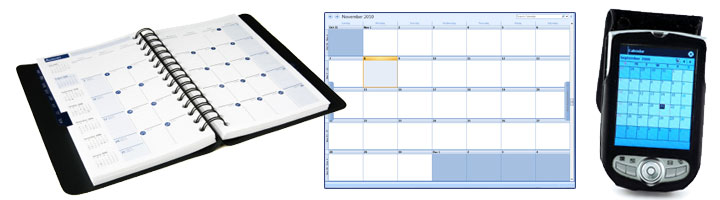
- You can use a week-by-week planner or agenda sold in most office supply stores.
- You can use a week-by-week electronic planner or agenda, such as Outlook or Google calendar.
- You can use a Personal Digital Assistant (i.e. Blackberry, Palm Pilot) or programs on your cellular phone.
- You could use our blank template.
- Print out new weekly calendars each week, or even better, print out the weekly calendar template, laminate it, and write it your schedule with a dry-erase marker (pens and permanent markers won’t erase). Each week you can erase your weekly schedule and add in your new schedule. This way, you won’t have to print out a new schedule each week.
Where should you keep your weekly calendar?
-
 |
Even though you are using a weekly calendar, you will also need to use a daily schedule! |
On your desk
- Near your computer
- On your refrigerator
- Posted next to your front door
- In your backpack, work bag, or purse
- In a place where you will see it every day