

Skip Navigation Do2Learn Logo
Getting a Job
Application Forms

Application Formats - Overview

Each company requires that you complete their application in a certain way. In the following are examples of ways to complete a job application:

  1. icon of hand writingWrite on the paper application then return it to the place of business.
  2. Download the application, complete it, and email it back to the company. 
  3. icon of computerComplete the online application and submit it electronically.

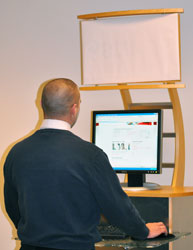
  4. Complete the application at an interactive kiosk at the place of business and submit it electronically.
  5. In store applications are usually advertised and completed at the site of the business, i.e. Help Wanted signs in window of stores, restaurants.  When applying be prepared with your resume and other information. 

Open sign in windowWhere do I find applications?

  •   In the actual place of business:

  • Note: Large companies often request applications to be submitted online only.  Some companies request applications to be completed in person on paper/ handwritten at the store or at an interactive kiosk at one of the business's locations.  Please check the company's website for directions about submitting applications.

  •   On the company’s website:
    A lot of companies require online applications. Here are a few examples, which may change over time.
    Advance Auto Parts
    Albertsons
    AmeriPark
    Best Buy
    Circuit City
    CVS
    Dicks Sporting Goods
    Family Dollar
    Finish Line
    Food Lion
    Entertainment
    Kroger
    Lowe’s Companies

    Nordstrom
    Marriott Hotels
    McDonalds
    Original Roadhouse Grill
    PetSmart
    Publix
    Six Flags
    ShopKo
    Southeastern Freight
    SuperValu
    Target
    Universal Studios
    Wal-Mart


  •  Employment Kiosk At an employment kiosk. This option is slowly being phased out.  Today, most companies use online applications:

    Even though the number of companies using the kiosk system is shrinking it will be helpful for you to read through this section.   A kiosk is a computer station located inside a store.  It looks similar to an ATM machine.  You can use an employment kiosk to complete the online application and to complete a pre-screening employment assessment.  Some large, incorporated stores have kiosks.   The main reason they provide kiosks is because not everyone has internet access at home. 

    We at JobTips do not recommend that you use employment kiosks to apply for a job. 

    There are several reasons why you should not use employment kiosks:

    1. You have little privacy because the kiosk is usually located near other customers.
    2. You might have trouble concentrating at a kiosk because the store environment is loud and distracting.
    3. Someone else might be waiting for you to finish so they can have a turn.  This could make you feel anxious.
    4. Not all kiosks provide chairs for seating.  You might have to stand up for 30 minutes or longer at the kiosk.

    Most small stores and privately owned businesses do not have employment kiosks. However, if you are considering using an employment kiosk to apply for a job, make sure you review these Employment Kiosk Tips first!
