 |
Getting a Job
Application Forms
Application Formats - Completing Online Applications
Here are some general guidelines for completing an online application:
- Each company’s online application will look different and will contain slightly different questions.
- Many online applications require that you provide an email address. Therefore, you should create an email account if you do not already have one. Free email accounts can be set up through Gmail.com, Yahoo.com, Outlook.com and mail.com, etc.
 Choose a quiet location to work in (i.e. your home, library, classroom). Choose a quiet location to work in (i.e. your home, library, classroom).
 Make sure you are working on a computer that you will be able to use for at least one hour. Make sure you are working on a computer that you will be able to use for at least one hour.
- If you are working on a laptop, be sure you can plug it in (to prevent the battery from dying while you are online).
- Make sure you are working on a computer with a stable and secure internet connection.

 Some online application forms are difficult to navigate (because of the format and the questions). If necessary, ask someone to assist you as you complete the online application. This person might be a family member, teacher, coach, mentor, etc. Some online application forms are difficult to navigate (because of the format and the questions). If necessary, ask someone to assist you as you complete the online application. This person might be a family member, teacher, coach, mentor, etc.
- Have every single item from the Application Checklist with you when you complete the application!
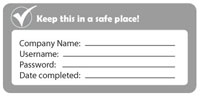
- Nearly all online applications require you to create a username or pin number, and a password. This means you have to create a username and a password that you will remember. Write it down and keep it in a safe place!
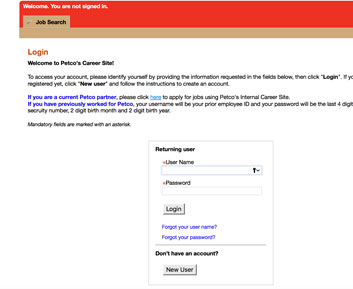
Here is an example of a page where you create your username and password:
below are the current pages to go through to set up your username and password for new applicants.
Type in Petco.com

Enter job search info

Click on “Apply Now”
|
 |
Most companies require that your username and password contain at least 8 characters, including some letters, some numbers, and at least one capital letter. Here are examples of good passwords that have at least 8 characters, a combination of letters and numbers, and some capital letters:
- Jobnow18
- Anime2010Totoro
- 17WakeForestDemonDeacon
|
|
- Most companies do not require that you finish the entire online application all at once. This means that you can save what you have done, log off, and log back on later. Some companies require that you log back on and finish within 48 hours, or else you will lose what you have completed so far. Other companies have a 30 or 60 day time limit on returning to an application.
- On an online application, many sections are called "required fields" or "mandatory fields." This means that you must fill in that section, or else the application cannot be submitted. Usually, a required field is indicated with a * symbol.
- An online application is usually broken up into many short pages. When you complete one page, you might hit a button that says "NEXT," "CONTINUE," or "SAVE." In nearly all cases, you cannot go on to the next page until you have completely filled in the page you are on.

- Never use the back arrow on the browser at the top of the screen! In most cases, that will kick you off the website and cause you to lose everything you have done so far.

-
 Some websites give you the option of uploading and submitting your resume. Other websites require that you upload and submit your resume. Whether it is an option or not, it is strongly recommended that you include your resume when applying for jobs online. Read more information about how to create a resume. Some websites give you the option of uploading and submitting your resume. Other websites require that you upload and submit your resume. Whether it is an option or not, it is strongly recommended that you include your resume when applying for jobs online. Read more information about how to create a resume.
- You may also be given the option of attaching a cover letter. While it is rarely required to submit a cover letter, it is also highly recommended that you do so. Read more about creating cover letters.
- When you have finished the application, make sure you hit the button that says something like SAVE or SUBMIT. If you exit the system without submitting the application, the company will not receive it and you might have to start all over!
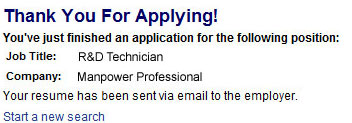
- You will then get confirmation that you submitted your application. It may say something like, "Thank you for submitting your application."
For more help, here's a handy printable: Tips to Completing Online Applications.
 |
GETTING A JOB
Application Forms
Application Formats - Finding Online Applications |
|
GETTING A JOB
Application Forms
Application Formats - What Happens Next? |
 |
|
|